Inside King's Quest(1984)
A reverse engineering deep dive into Sierra On-Line's AGI engine — extracting vector graphics, sprite animations, and compiled game logic from the original floppy disk.
> Backgrounds — Vector Art
Every background in King's Quest is stored as a series of vector drawing commands— not pixel bitmaps. Lines, fills, and brush patterns are executed by a state machine to produce 160×168 pixel images. This saved precious floppy disk space while enabling the rich, colorful scenes below.
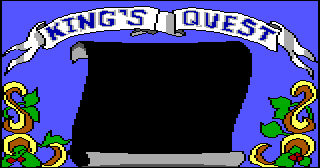
The iconic King's Quest banner -- drawn entirely with vector line and fill commands
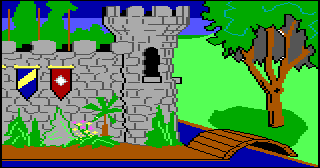
King Edward's castle with shields, drawbridge, and alligator-filled moat
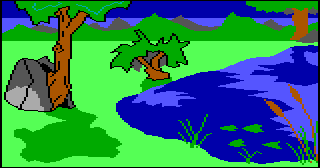
A peaceful pond scene with a gnarled tree and cattails
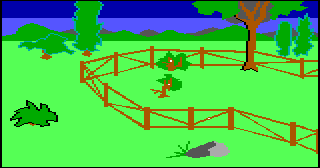
The fenced goat pen area -- home to your future traveling companion
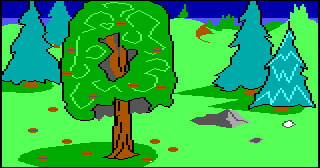
Dense forest with pine and deciduous trees, typical of Daventry's wilderness
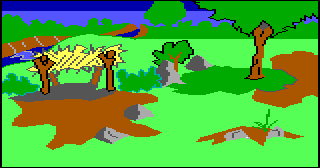
A clearing with golden trees and winding dirt paths
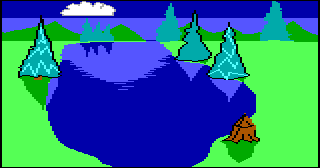
A massive lake scene with surrounding pine trees and a small cloud
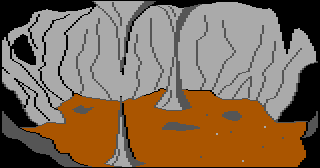
A dark cavern with stalactites -- the dragon's lair
> Sprites & Characters
Characters and objects are stored as VIEWresources — collections of Loops (directions/animations) containing Cels (individual frames). Each cel uses RLE compression with transparency, and loops can mirror each other to save space (left-facing = flipped right-facing).
Characters
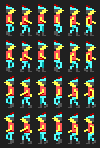
The hero -- a brave knight on a quest to save Daventry. 4 directional walk cycles.
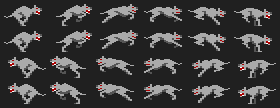
A vicious wolf that chases Graham through the forest. Red-eyed and fast.
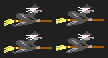
A wicked witch on a broomstick who swoops down to grab you.

Your magical protector -- grants a spell of invisibility.

A fire-breathing green dragon guarding treasures in its cave.
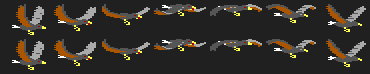
A great eagle/condor with a majestic flight animation.
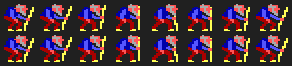
Rumplestiltskin! Guess his name correctly for a reward.

Your loyal (and sometimes sacrificial) companion.

Swimming in the castle moat -- don't fall in!
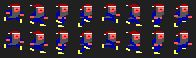
A sneaky dwarf who tries to steal your treasures.
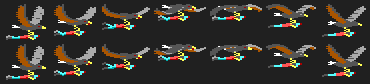
The condor carrying Graham through the sky.

Creatures lurking in the waters around the castle.
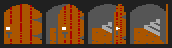
Items & Objects




> How the AGI Engine Works
Architecture Overview
The AGI (Adventure Game Interpreter) engine is a virtual machine designed by Sierra On-Line in 1984. It runs compiled bytecode scripts (LOGIC resources) that control everything: room transitions, NPC behavior, parser input, inventory, and scoring.
Game Loop (~20 Hz)
- Poll keyboard & joystick input
- Parse player text commands
- Execute all loaded LOGIC scripts
- Update object positions & animations
- Render visual screen with z-ordering
- Repeat
Resource Types
- LOGIC — Compiled bytecode scripts
- PIC — Vector background art
- VIEW — RLE sprite animations
- SOUND — PC speaker / Tandy audio
- OBJECT — Inventory item definitions
- WORDS.TOK — Parser vocabulary
PIC: Vector Drawing Engine
Backgrounds are stored as compact sequences of drawing commands — not bitmaps. A state machine reads opcodes 0xF0–0xFFand draws onto two parallel 160×168 buffers (visual + priority).
0xF0 color   -- Set visual color & enable drawing
0xF1         -- Disable visual drawing
0xF2 color   -- Set priority color & enable
0xF3         -- Disable priority drawing
0xF4 x,y ... -- Y-corner step lines
0xF5 x,y ... -- X-corner step lines
0xF6 x,y ... -- Absolute line segments
0xF7 x,y ... -- Relative line (packed displacements)
0xF8 x,y ... -- Flood fill from seed points
0xF9 style   -- Set brush pen (size, shape, texture)
0xFA x,y ... -- Plot with current brush
0xFF         -- End of picture
The castle exterior (PIC 1) is only ~2KBof drawing commands but produces a detailed 320×168 image. That's how Sierra fit 82 backgrounds on a single 360K floppy disk.
VIEW: RLE Sprite Compression
Each animation frame (cel) is encoded with Run-Length Encoding. A single byte packs both color and run length:
Each byte: [color:4][count:4]
  Upper nibble = EGA color (0-15)
  Lower nibble = pixel count (1-15)
  0x00 = end of scanline

Example: 0x43 0xF2 0x00
  -> 3 pixels of color 4 (red)
  -> 2 pixels of color 15 (white)
  -> end of line, fill remaining with transparent

Loops can MIRROR other loops:
  Loop 0 (right-facing) -> data
  Loop 1 (left-facing)  -> mirrors loop 0, flipped
The EGA Palette — All 16 Colors
The entire game uses just 16 fixed colors from the EGA standard. Every pixel in every background and sprite is one of these:
LOGIC: Bytecode Scripting
Game behavior is written in Sierra's custom scripting language, compiled to bytecode. The engine provides 183 action commands and 20 test conditions. Text strings are XOR-encrypted with the key "Avis Durgan" (cycling every 11 bytes).
+-----------------------------------+
| Bytes 0-1: Messages offset (LE)  |
+-----------------------------------+
| CODE SECTION                      |
|   0xFF [...tests...] 0xFF        |  <- if() block
|     jump_offset (2 bytes)         |
|   action_opcode arg1 arg2...      |  <- commands
|   0xFE jump_offset                |  <- else/goto
+-----------------------------------+
| MESSAGES SECTION                  |
|   num_messages (1 byte)           |
|   end_offset (2 bytes)            |
|   offset_table (2 * N bytes)     |
|   XOR-encrypted text strings      |
|   Key: "Avis Durgan" (cycling)    |
+-----------------------------------+
Virtual Machine State
256 Variables (8-bit)
v0  = currentRoom
v1  = previousRoom
v3  = currentScore
v6  = egoDirection
v7  = maxScore (158)
v17 = errorCode
v19 = keyPressed
256 Flags (boolean)
f0  = egoOnWater
f2  = playerControl
f4  = wordNotFound
f5  = newRoom (just entered)
f6  = restartGame
f9  = soundOn
> Disassembled Game Logic
Here's actual disassembled bytecode from the game, showing how rooms, NPCs, and player interactions work. The said() commands match player text input against the vocabulary.
if (isset(f5(newRoom))) {
  load.pic(0);
  draw.pic(0);          // Draw castle background
  discard.pic(0);
  set.horizon(50);      // Sky/ground boundary

  // Place moat creatures
  load.view(107);
  animate.obj(11);
  animate.obj(12);
  set.view(11, 107);
  position(11, 121, 161);
  position(12, 73, 166);
  object.on.water(11);
  object.on.water(12);
  wander(11);           // Random movement
  wander(12);

  draw(0);              // Draw ego (Graham)
  show.pic();
  accept.input();
}

// Player types "look"
if (said(2, 137)) {
  print("You are standing outside a castle surrounded
         by an alligator filled moat.");
}

// Player types "swim" near moat
if (said(2, 151)) {
  print("The water in the moat is not conducive
         to swimming.");
}// Witch appears and chases Graham
load.view(3); // Witch sprite
animate.obj(1);
set.view(1, 3); // Assign witch to object 1
// Protection checks
if (isset(f75)) {
print("Lucky for you that you are invisible,
the witch can't find you.");
}
if (isset(f70)) {
print("The witch can feel your protective spell
and bids a hasty retreat.");
}
// Goat scares witch away!
if (isset(f68)) {
print("There is a witch in the area, but since
you have that menacing goat with you,
she will keep her distance.");
}
// Witch catches you
print("The witch swoops down, grabs you by the neck,
and carries you off to a fate worse than death.");// Dragon encounter setup
load.view(33); // Dragon sprite
load.view(61); // Fire breath effect
animate.obj(1);
set.view(1, 33);
// Player throws dagger
if (said(174, 146) && has(9)) {
print("Nervously, you throw the dagger at the dragon
and strike it in the heart. Death for the
dragon is instant.");
// Dragon dies, reveal mirror treasure
}
// Player tries to fight without weapon
print("You need a weapon to fight a dragon!");> Easter Eggs & Secrets
Death Messages
Sierra was famous for creative player deaths. Here are some from the game data:
Funny Responses
Try typing weird things and the parser has something to say:
Developer Credits (Hidden in Data)
These messages were XOR-encrypted with “Avis Durgan” in the game binary. Decrypting them reveals:
The “Avis Durgan” Mystery
All text strings in the game are XOR-encrypted with the key "Avis Durgan". Who is Avis Durgan? The encryption was meant to prevent casual hex-editor snooping of game text (spoilers!) rather than serious security. Our disassembler cracks it automatically by XOR'ing each byte with the corresponding position in the repeating 11-byte key.
> Technical Details
How This Was Built
This entire project was built by reverse engineering the original King's Quest floppy disk image downloaded from Archive.org. No existing extraction tools were used — all parsers and renderers were written from scratch in Python.
Extraction Pipeline
- Extract files from FAT12 floppy image using mtools
- Parse *DIR files (3 bytes/entry) to build resource index
- Read VOL files (verify 0x1234 signature, extract by offset)
- Decode each resource type with format-specific parsers
Disk Layout
VOL.0    48KB  --+
VOL.1   200KB    +-- Resources
VOL.2    91KB  --+
LOGDIR    315B --+
PICDIR    255B   |-- Directories
VIEWDIR   432B   |   (3 bytes/entry)
SNDDIR    144B --+
WORDS.TOK 3KB  -- Vocabulary
OBJECT    331B -- Items
Tools Written
agi_common.py— Resource loaderrender_pic.py— PIC vector renderer (~400 LOC)render_view.py— VIEW sprite renderer (~200 LOC)disasm_logic.py— Bytecode disassembler (~350 LOC)